Look at the below screenshot of BrainStormWFO. In each pane, you can only see the children of one parent entry. That’s called “auto-hoisting”.
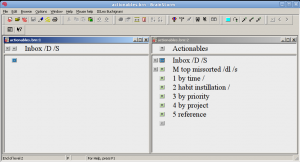

This extreme forced focus is both its greatest strength and biggest weakness.
Think of BrainStormWFO like a good hammer. Its head has two ends – one for pounding nails and one for pulling them out. Because of this perfection of design, it is useless for sawing wood.
Likewise, BrainStormWFO is useless when trying to get a sense of the big picture. It is specialized for inductively building knowledge from the ground up, not for visually communicating the finished picture back to the user.
What It’s Like Working in Extreme Focus
The experience of working this way is somewhat unique.
It’s like being in a poorly-lit shoot-em-up video game, with flashing corridors, where you can only see one room of bad guys at a time.
Here’s another analogy: BrainStormWFO is like the amnesiac killer in the movie Memento, endlessly repeating a savage pattern. That pattern is not avenging his wife’s death, but chopping blocks of information into neat categories, clearing outlines layer by layer.
Once you become accustomed to this method of working, you’ll realize that it’s the most efficient way to inductively structure your thoughts.
It’s a bit like a grenade – you only use it when you’ve got massed groups of complexity that can’t be handled by normal means.
Getting Over the Claustrophobia
When you first open BrainStormWFO, you’ll probably think to yourself, “That’s it?”
As you begin working, you may begin to feel constrained, the walls pressing in. You’ll startobsessively jumping up and down outline levels to keep track of the larger context.
If this happens, you’re using it wrong!
There are two causes of “claustrophobia effect” when working with BrainStormWFO:
1. You’re not used to the program yet.
2. You’re improperly trying to use it for a big picture overview.
The solution for 1. is easy… just add time.
If you experience 2., that’s a signal to use a different software tool for this portion of your task.
Rotating your tools is covered in this article: “How to Brainstorm with BrainStormWFO”.
This is easy to do, because BrainStormWFO conveniently imports and exports to other programs via copy-paste.
Why Use a Tool That Can’t Do Everything?
If BrainStormWFO is so bad at displaying overviews, why use it? Why not use a tool that does everything instead?
Well, that’s the problem. There aren’t any tools that do everything well.
There are tools that TRY to do everything, but they end up doing NOTHING well.
You can read detailed comparisons of BrainStormWFO with other types of of PIM software here. (PIM stands for Personal Info Manager.)
Think of it this way – would you buy a combination hammer, saw and drill? No. Can a hammer saw wood? No. Would you try to build a house without a hammer? No.
BrainStormWFO is a hammer. Nails are basic to construction. Organization is basic to thought.